 Vidiyo
Sell products
Add products to your Shop in Vidiyo Studio, tag them on videos and live streams, and track clicks, orders, and commissions from one page.
Shop is a product catalog inside Studio. You add each item once with a title and a price, then tag it onto a video or a live stream. Viewers see a Shop chip while they watch and can buy without leaving the player.
You choose how the sale closes. Leave the product URL blank and the buyer checks out on Vidiyo through Stripe. Add a URL and the Buy button opens your own store page through a tracked link.
Before you start
- You need a product to sell and, if you want to send buyers to your own store, the page URL for it.
- Native checkout on Vidiyo needs a connected Stripe account so the money can reach you. See Get paid.
- Shop is available on vidiyo.com. A brand site may have shopping turned off, in which case the page reads Shopping is not available on this brand site.
Steps
1. Open Shop
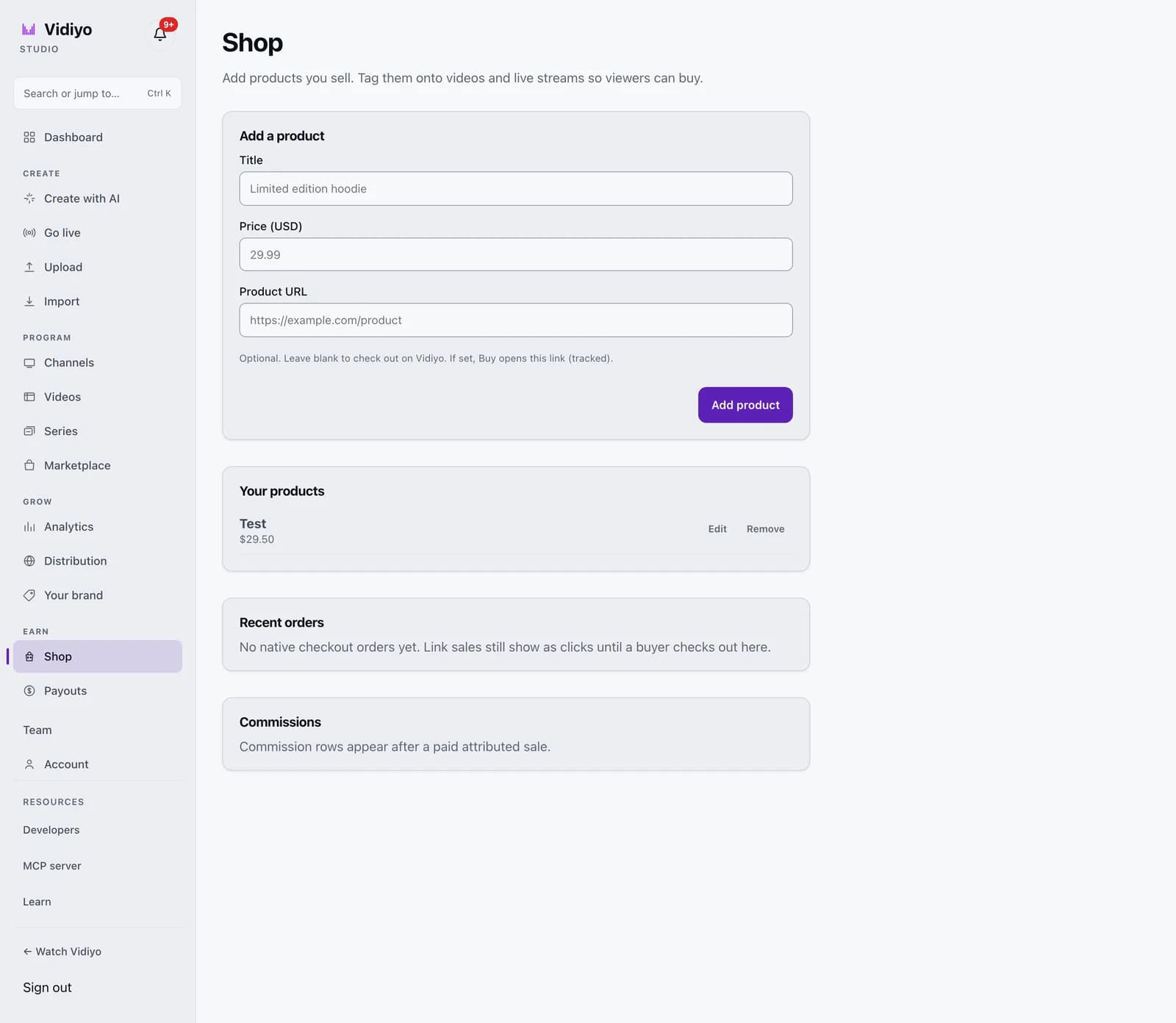
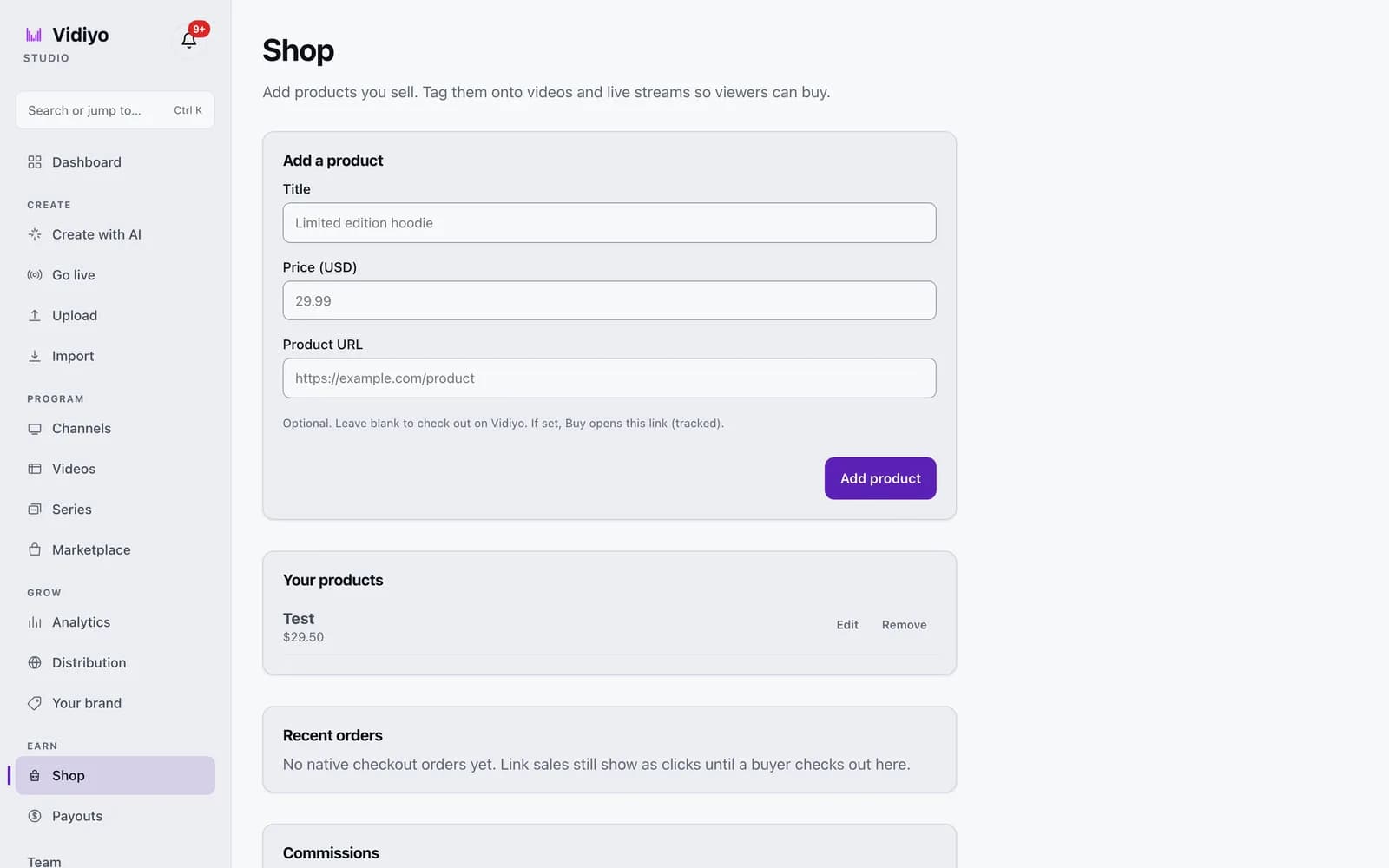
In the Studio sidebar, under Earn, click Shop. The page has four cards: Add a product, Your products, Recent orders, and Commissions.
2. Add a product
In Add a product, fill in Title (up to 200 characters) and Price (USD) as dollars and cents, for example 29.99. Product URL is optional. Leave it blank to check out on Vidiyo. Set it and the Buy button opens that link, with the click tracked. Click Add product. A toast confirms Product added and the item appears under Your products.
3. Edit or remove a product
In Your products, each row shows the title, price, and URL if you set one. Click Edit to load it back into the form; the card title changes to Edit product and the button to Save changes. Click Remove to delete it. Removing a product also removes it from any video or stream it was tagged on.
4. Tag a product on a video
Open Videos, then open the video. Scroll to the Shop products card. Every product in your catalog is listed with a Tag button. Click Tag to attach it; the button changes to Untag. Viewers watching that clip or its On Demand page see a Shop chip with the product title and price.
5. Tag or feature a product on a live stream
While you are live, the Go live studio shows a Shop card. Click Tag next to a product to attach it to the stream. Click Feature to pin one product on the player for viewers. A featured product is marked Featured in the list. Click Remove to take it off the stream.
6. Read orders and commissions
Recent orders lists native checkout orders with amount, status, and date. Until a buyer completes checkout on Vidiyo, the card reads No native checkout orders yet; link sales show as clicks, not orders. Commissions lists what you earned from paid sales attributed to your video or stream. It reads Commission rows appear after a paid attributed sale until then.
Tips
- Prices accept up to two decimal places. A price like 19.999 is rejected with Enter a valid price like 19.99.
- A product with a URL costs you nothing on Vidiyo. You handle payment and fulfillment on your own store, and Vidiyo counts the click.
- Feature only one product at a time on a live stream. The featured chip stays on the player, so pick the item you are talking about now.
- The Shop chip appears on clip pages, On Demand pages, and live event pages. It does not appear inside the 24/7 channel player.
Quick answers
How do buyers pay when I check out on Vidiyo?
They click Buy on the Shop chip and go to a Stripe Checkout page. Buyers must be signed in to Vidiyo; a signed-out viewer is sent to sign in first and then returned to checkout. When the payment settles, the order appears under Recent orders and your share is added to your Stripe payout.
What does Vidiyo take on a sale?
On a native checkout sale of your own product, Vidiyo keeps a 10% platform fee and the rest is credited to your payout. On a link sale, Vidiyo takes nothing; the buyer pays you on your own site.
Can I sell without a Stripe account?
Yes, with a product URL. The Buy button sends the viewer to your store and Vidiyo records the click. Native checkout needs a connected Stripe account so the payout has somewhere to go.
Where do viewers see my products?
On the page for any clip or On Demand video you tagged, and on your live event page while you are streaming. A featured live product is pinned on the player.
What happens to my commission if a buyer refunds?
If the payout is still pending, the refunded amount is removed from it. If the payout has already been scheduled or transferred, the commission row is marked reversed and flagged for review.
Open Studio
Upload a video, go live, or program your channel. Studio is free, and every guide here walks you through one task.